Availability & team selection
The cricket availability app that fills your team sheet.
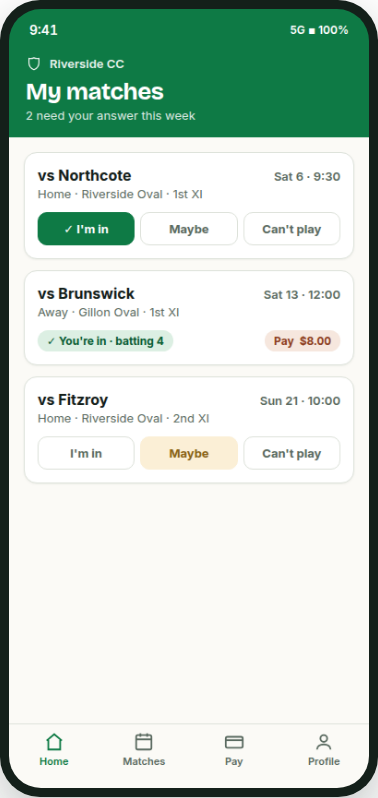
No more chasing eleven "yeah, in" replies across three group chats. Players answer straight from a notification, the captain watches the list fill live, and the team sheet goes out with the XI in batting order.
It's the same job a captain's always done: work out who's playing, pick the side, tell everyone. BoundarySide just does it without the screenshot of a screenshot, the "bump" message on Thursday, and the scramble for a twelfth man on Friday night.
Free to start · iOS & Android · also works as a web app at app.boundaryside.com · built for selection night, not a spreadsheet.
Friday night to Saturday sorted
How the team sheet actually gets made.
Every club knows the Friday-night version of this: half the side hasn't replied, someone's "maybe" for the third week running, and the captain's typing the same message into a different chat for the fourth time. BoundarySide runs the same week differently.
- The fixture goes in, hand-entered in seconds, or pulled in with an optional, read-only PlayHQ import.
- Players get a notification and answer "I'm in" or "Can't play" straight from it. No app hunting required.
- The captain watches the list fill live through the week, instead of scrolling back through a group chat on Friday night.
- Pick the XI, drag to batting order, and send the team sheet so everyone knows where they're batting before they've had breakfast.
Selection night
Pick the XI, drag to order, done.
Once the list's in, selection is a drag, not a debate about who texts who. Set the batting order by dragging names into place, and the team sheet that goes out shows every player exactly where they're batting. No separate message needed, no "wait, am I opening?"
Squad still needs trimming on the morning of? Swap it in the same screen and resend. The team sheet updates for everyone at once, so there's one version of the truth instead of a captain's text and an out-of-date one pinned in the group chat.
Fixtures
Get the fixture in, however suits your club.
Most clubs just type the fixture in: opponent, ground, start time, done in seconds. If your comp's on PlayHQ, BoundarySide can pull the fixture in for you, and manual entry always works as the fallback if a round changes or PlayHQ's having a day off.
Every club already has its own way of finding out the fixture, whether that's a comp draw, a committee spreadsheet, or a text from the other captain. BoundarySide isn't trying to replace any of that. It just gives you somewhere quick to put it, so selection can start.
Once the side's picked, the fees collect themselves.
Match fees are the other half of BoundarySide: same app, same team sheet, no separate spreadsheet for who's paid. The XI that's just been picked is the same list the treasurer works from, so nobody's re-typing names into a second system on Sunday morning. See match fees.
Get your team sheet sorted.
Set it up in a few minutes, bring your players in with a join code, and the next fixture is ready to go out for availability.
Get it on Google Play. Coming soon to the App Store.